
Invoice Maker - MobileBiz Pro
Mobilebiz SystemsBusiness
3.6671.00 Reviews
- Version
- 1.5.6
- Installs
- 10.00K
- Age Rating
- Everyone
Screenshots
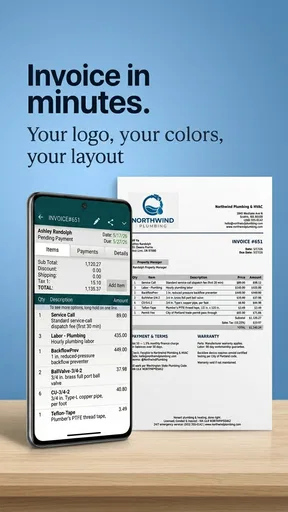
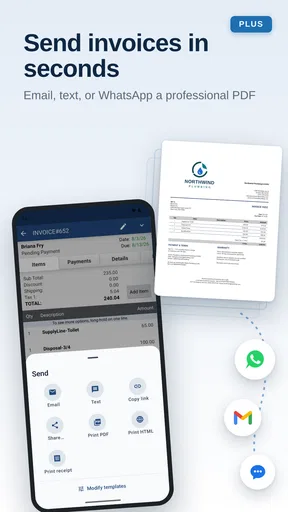
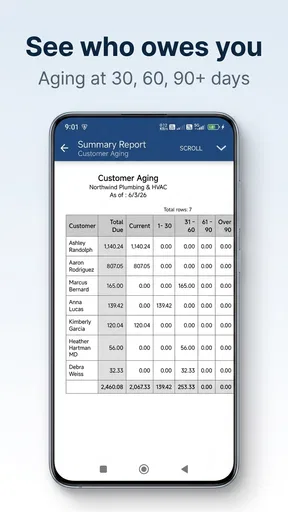
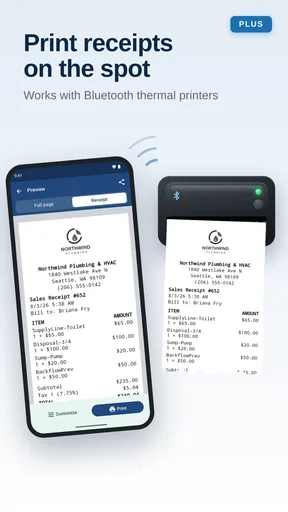
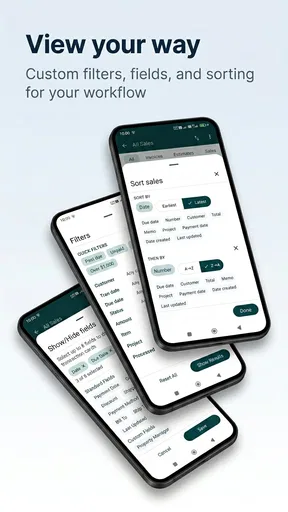
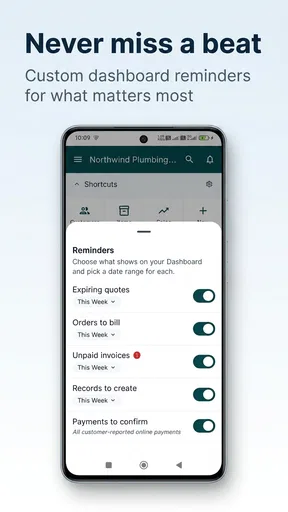
Our Review of Invoice Maker - MobileBiz Pro
 Analysis by Appyee
I approached Invoice Maker - MobileBiz Pro as a practical business tool rather than a polished accounting suite. It is a free Android app from Mobilebiz Systems for making invoices, estimates, and sales orders, while also keeping an eye on payments, inventory, and reports. What makes it interesting is that these tasks can be handled offline, which is useful when I am working away from a reliable connection or serving customers from a small shop, workshop, or mobile business.
My overall impression is mixed in a useful way: this feels like a focused utility for people who need basic transaction records close at hand, not a complete replacement for bookkeeping software. The app has been available since late 2010, and its current version is 1.5.6. That long presence gives it a practical, established feel, although the modest average rating of 3.6 from around two thousand ratings also suggests that the experience will not suit everyone.
What it feels like to use for everyday business work
The most convincing use case is a small operation where an invoice needs to be prepared quickly and the owner does not want to carry a laptop everywhere. I can imagine a repair technician finishing a job at a customer’s home, opening the app, preparing the charge, and recording the payment before leaving. A market seller, independent consultant, or tradesperson could use the same workflow to keep estimates and completed sales together instead of writing details on paper and entering them later.
The offline emphasis matters here. It changes the app from a simple document maker into a pocket record system: I can continue working when a basement, warehouse, rural area, or crowded event has poor connectivity. That does not automatically make the records complete or professionally managed, but it does remove one common interruption from a small business routine.
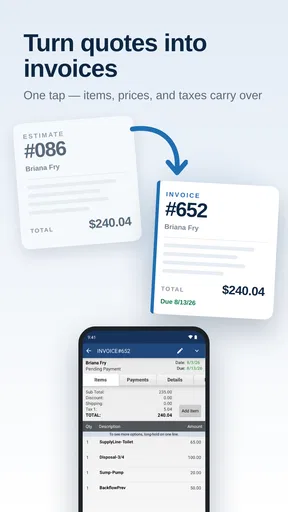
I also like the relationship between estimates, invoices, and sales orders. These are not identical documents, and keeping them in one business app can reduce the chance of retyping the same customer or product information several times. The practical benefit is greatest when a quote becomes an approved order and then turns into a payable invoice. A paper notebook can hold the same information, but it is much easier to lose the connection between stages.
Inventory and reports give the app a wider purpose than a basic invoice generator. I would not treat those tools as a full stock-control or accounting system without testing the workflow against my own business, but their presence makes the app more useful for someone who sells a limited range of goods or needs a quick view of activity. For a service business with no physical products, inventory may be less important, while payment tracking and document history may matter more.
Where the offline approach helps most
Working offline is especially helpful when the priority is speed. If I am standing in front of a customer, I do not want a document workflow that depends on loading a web dashboard or waiting for a connection. I can enter the transaction while the details are fresh, then review the record later when I have time to reconcile my wider accounts.
There is a trade-off, though. An offline-first workflow rewards discipline. I would make a habit of checking saved invoices, payment status, and inventory changes at the end of each workday. Without that routine, a convenient mobile record can become a second, incomplete version of the books. The app may help me capture information, but it does not remove the responsibility to verify it.
That is one of the less obvious points about this kind of tool: convenience can create false confidence. A report on a phone may look tidy while still reflecting incomplete entries, an incorrectly marked payment, or stock that was not updated after a sale. I would use the reports as working information and compare them with bank records and formal accounting records before making important financial decisions.
Invoices, estimates, and sales orders in one workflow
The document mix is a genuine strength for a small business that sells through several steps. I would start with an estimate when the final work or quantity is not settled, use a sales order once the customer commits, and issue an invoice when the amount is ready to collect. Keeping those stages distinct is more useful than treating every customer interaction as an immediate invoice.
A realistic example would be a custom furniture maker. The maker could prepare an estimate for materials and labor, record the customer’s order once the design is accepted, and later issue the invoice when the piece is ready. The app’s value in that situation is not just producing a document; it is helping the owner remember what stage each job has reached.
For a very small business, this may be enough structure. For a company with several staff members, complex tax rules, recurring billing, multiple locations, or detailed approval processes, I would look toward a broader accounting or enterprise invoicing platform instead. MobileBiz Pro appears better suited to direct, owner-managed work than to a large team with elaborate controls.
Payments, inventory, and reports: useful, but handle them carefully
Payment tracking is the feature I would use most cautiously. Marking an invoice as paid is convenient, but a status inside an app is not the same thing as a cleared bank transaction. I would record the payment when the customer actually pays, keep the payment method or reference in whatever field the app provides, and still reconcile the result with my bank or cash records.
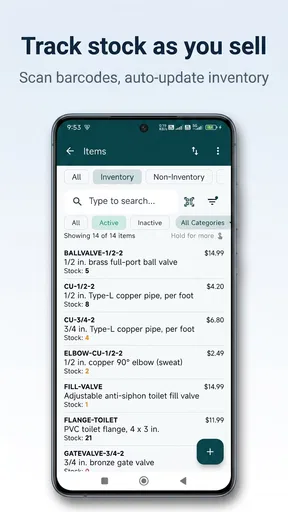
Inventory can be valuable when the product list is manageable. A small retailer or mobile vendor could use it to avoid guessing what remains after several sales. The practical tip is to establish a starting count before relying on later reports. If the opening quantities are wrong, every later stock figure can look precise while being inaccurate.
Reports are most useful for spotting patterns and omissions. I would use them to ask simple questions: Which invoices are still outstanding? Did I record all completed jobs? Does the inventory count make sense after the weekend? I would not assume that a report replaces a tax calculation, an accountant’s review, or a properly maintained ledger.
This distinction is important for trust. A business app can help me organize my own entries, but I need to understand which results are records I entered and which conclusions require outside verification. The more financially important the decision, the less I would rely on a phone report alone.
Trust, controls, and moments that deserve extra care
Because this app handles invoices, customer details, payments, and possibly product information, I would judge it by user control as much as by convenience. The store identifies it as suitable for Everyone, and it is free to install, but that does not mean every business workflow is automatically low-risk. The important question is whether I can operate it deliberately and understand what I am recording at each step.
The app has in-app purchases ranging from ninety-nine cents to one hundred forty-nine dollars and ninety-nine cents per item. That is a wide range, so I would pay attention to every purchase screen and confirm what an optional item provides before approving it. A free download can still lead to meaningful spending, particularly if I am testing the app on a work device used by more than one person.
My practical safeguard would be simple: keep purchasing controls under the owner’s account, do not let casual users approve upgrades, and review any charge before treating the app as part of a permanent business process. This is not a criticism unique to MobileBiz Pro; it is a sensible boundary whenever a free business utility offers paid additions.
I would also separate testing from live records. Before entering real customer information, I would create sample estimates, invoices, sales orders, payment entries, and inventory changes. Then I would inspect how those items appear in reports and whether the workflow matches the way I actually sell. This test phase is one of the best ways to discover friction without risking a real customer record.
Data-sensitive moments in normal use
The sensitive moments are easy to overlook because they happen during ordinary work. Entering a customer’s name, address, phone number, job details, product list, or payment status creates a record that deserves care. I would avoid typing unnecessary personal information into an invoice and would use only the details needed for the transaction.
I would also be careful when showing a customer an invoice on the phone. A screen can reveal other customer names, previous transactions, or stock information if I leave the wrong page open. A quick habit of returning to a neutral screen after each transaction is small, but it reduces accidental disclosure in a busy shop or during a home visit.
Shared devices require even more attention. If several employees use one phone or tablet, I would establish a clear rule about who may create documents, change payment status, or adjust inventory. The app may be convenient for an owner working alone, but a shared-device workflow needs explicit human controls even when the software itself is simple.
I would not put highly sensitive notes into ordinary invoice fields merely because there is space for them. Customer-facing documents should contain what the customer needs, while private business observations belong in a controlled system intended for that purpose. Keeping the app’s records focused also makes later reporting easier to understand.
Who should choose it, and who should skip it
I think this app is a reasonable fit for a sole proprietor, small retailer, field technician, freelancer, or side business that needs invoices and estimates without committing immediately to a larger subscription platform. It is particularly appealing when offline work is a regular part of the day and the owner wants payment, inventory, and report functions in the same place.
I would be more hesitant to recommend it to a growing company that needs sophisticated collaboration, formal accounting controls, advanced tax handling, or a detailed audit trail. I would also skip it if my main requirement were a beautiful customer portal, automated recurring billing, or deep integrations with other business systems. In those situations, a modern cloud accounting service or specialized invoicing platform is likely to be a better match.
It is also not ideal for someone who wants the app to make financial decisions for them. The tool can organize transactions, but I would still need to understand my cash flow, confirm payments, check stock, and maintain whatever official records my business requires. The more complicated the business becomes, the more likely I am to outgrow a compact mobile workflow.
How it compares with familiar alternatives
Compared with a paper invoice book, MobileBiz Pro offers a more connected process because estimates, sales orders, invoices, payments, inventory, and reports can live in one digital workflow. The advantage is speed of retrieval and less repeated writing. The disadvantage is that I must learn the app and maintain the device instead of simply carrying a paper pad.
Compared with a spreadsheet, it is more directly shaped around sales documents. A spreadsheet can be customized extensively, but that freedom often leads to inconsistent formulas, accidental edits, and separate tabs that do not agree. I would choose the app when I want a ready-made transaction process, and a spreadsheet when I need unusual calculations or a highly customized internal model.
Compared with full accounting software, the appeal is simplicity and mobility. A larger platform may provide stronger automation, broader reporting, and better support for teams, but it can also take longer to configure and may impose a recurring cost or a more demanding workflow. MobileBiz Pro makes more sense when the business owner values direct entry and offline access over a complete financial ecosystem.
My way of testing it before relying on it
I would spend one short test cycle using fictional customer and product details. First, I would create an estimate, convert the work into a sales order, and then produce an invoice. Next, I would record a payment and check whether the report reflects the change clearly. Finally, I would alter a sample inventory quantity and compare the resulting stock view with my own calculation.
I would repeat the same process offline, then review the records after reconnecting. That test answers a practical question that a store summary cannot answer by itself: does the app fit the way I work when the network is unavailable? I would also examine every screen involving purchases, especially before allowing another person to use the device.
After testing, I would decide whether the app is a daily system or merely a capture tool. If it handles my basic documents reliably but lacks the controls needed for final bookkeeping, I could still use it to collect field transactions and transfer the information into a more formal system later. That hybrid approach may be sensible for a small business, provided I schedule the transfer and do not leave mobile records unreconciled.
My cautious verdict
MobileBiz Pro is a practical, narrowly focused business app with a clear reason to exist. I like the combination of invoices, estimates, sales orders, payment tracking, inventory, and reports, especially when work has to continue offline. Its free entry point makes it easy to test, and the Everyone age rating keeps the presentation approachable.
At the same time, I would not mistake it for a complete accounting department in an app. The average rating of 3.6 and its roughly ten thousand installs suggest a smaller, more mixed user base than the biggest business platforms, so I would test it carefully rather than moving all records immediately. I would also monitor in-app purchase prompts, limit access on shared devices, and verify important financial information outside the app.
My recommendation is cautious but positive: try it if you run a small, hands-on business and need a mobile way to keep sales paperwork organized without depending on a connection. Start with sample records, create a backup routine that fits your wider bookkeeping, and treat reports as working aids rather than unquestionable financial truth. If your needs are simple, this can be a useful pocket counter and invoice desk; if your business needs deep automation or formal multi-user controls, choose a more comprehensive alternative instead.
Verdict
Strengths of Invoice Maker - MobileBiz Pro
- Create professional invoices directly from your Android or iOS device.
- Useful templates help speed up recurring billing and client paperwork.
- Supports customer and product records for faster invoice preparation.
- Can be practical for freelancers and small businesses working on the go.
- Helps keep billing information organized without needing desktop software.
Limitations of Invoice Maker - MobileBiz Pro
- Advanced features may require a paid subscription or in-app purchase.
- The interface can feel crowded when managing many clients or items.
- Some users may need time to learn the available billing and tax options.
- Mobile data or syncing limitations may affect access while working offline.
- Not ideal for larger companies needing comprehensive accounting tools.
Similar Picks in This Category
View All
LinkedIn: Community & Network
LinkedIn3.8

Zoom Workplace
zoom.com4.1

Microsoft Teams
Microsoft Corporation4.6

Meta Business Suite
Meta Platforms, Inc.4.6

Webex Meetings
Cisco Systems, Inc.4.5

TeamViewer Remote Control
TeamViewer4.4
Frequently Asked Questions
What is Invoice Maker - MobileBiz Pro used for?
Invoice Maker - MobileBiz Pro is designed to help freelancers, contractors, small businesses, and mobile professionals create and manage invoices from an Android or iOS device. During use, the app focuses on practical billing tasks such as adding customers, listing products or services, calculating totals, recording payments, and keeping invoice information organized without requiring a desktop accounting program.
Can I customize invoices in Invoice Maker - MobileBiz Pro?
Yes, the app provides options for preparing professional-looking invoices rather than limiting users to a completely fixed template. You can generally add business details, customer information, item descriptions, prices, taxes, discounts, notes, and payment terms. Depending on the version and subscription plan, additional branding or layout features may be available, so it is worth checking the current feature list before downloading.
Does Invoice Maker - MobileBiz Pro support estimates, receipts, and payment tracking?
Invoice Maker - MobileBiz Pro is intended to cover more than simply creating a bill. Users can typically prepare estimates or quotes, convert approved work into invoices, issue receipts, and mark invoices as paid or unpaid. These tools are useful for monitoring outstanding balances and following a basic billing workflow, although businesses needing advanced accounting, payroll, or inventory management may still require separate software.
Can I send invoices directly to customers from the app?
The app is built for sharing invoices digitally, allowing users to send or export documents through common options such as email, messaging applications, or file-sharing tools, depending on the device and installed apps. Before relying on it for your business, review the available export formats and confirm whether features such as PDF creation, invoice delivery, reminders, or online payment links are included in your selected plan.
Is Invoice Maker - MobileBiz Pro free to use, and are there any limitations?
The application may be available to download at no initial cost, but some advanced capabilities can be restricted by a paid version, subscription, trial period, or in-app purchases. Limits may involve the number of invoices, customer records, templates, reports, cloud synchronization, or removal of advertisements. Check the current store listing and pricing carefully, since availability and included features can change between Android and iOS versions.
